Open Dockbox on any page
Click the extension while you browse. AI chat lives in your Chrome sidebar—one click away from whatever you're reading.
AI chat · Chrome sidebar assistant
Dockbox puts an AI chatbot in your Chrome sidebar. Ask questions, get instant answers, and keep browsing—so help stays in your workflow, not another tab.
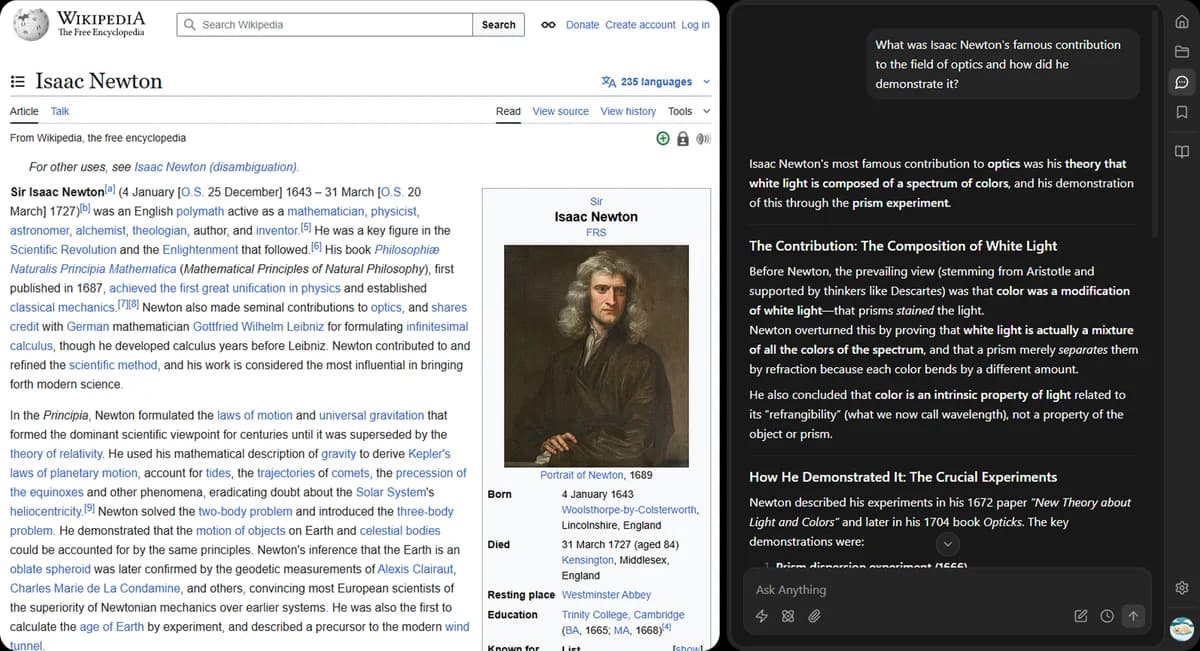
Click the extension while you browse. AI chat lives in your Chrome sidebar—one click away from whatever you're reading.
Get streaming answers in Fast, Default, or Thinking mode. Attach images when you need help with what you're looking at.
Keep the page open, keep chatting. Your conversation history stays in the sidebar so you can pick up where you left off.
Standalone chat apps pull you out of what you're doing. Dockbox keeps AI next to your current tab, alongside your notes and summaries.
Notes, AI chat, and YouTube summaries — all in one Chrome sidebar.
Install Dockbox and ask your next question from the sidebar—while the page you're on stays right where you left it.