Open any YouTube video
Watch as usual—or paste a link below. Dockbox lives in your Chrome sidebar, one click away.
YouTube summarizer extension · AI Chrome sidebar
Dockbox captures, summarizes, and organizes videos directly in your Chrome sidebar—so learning stays in your workflow, not in another tab.
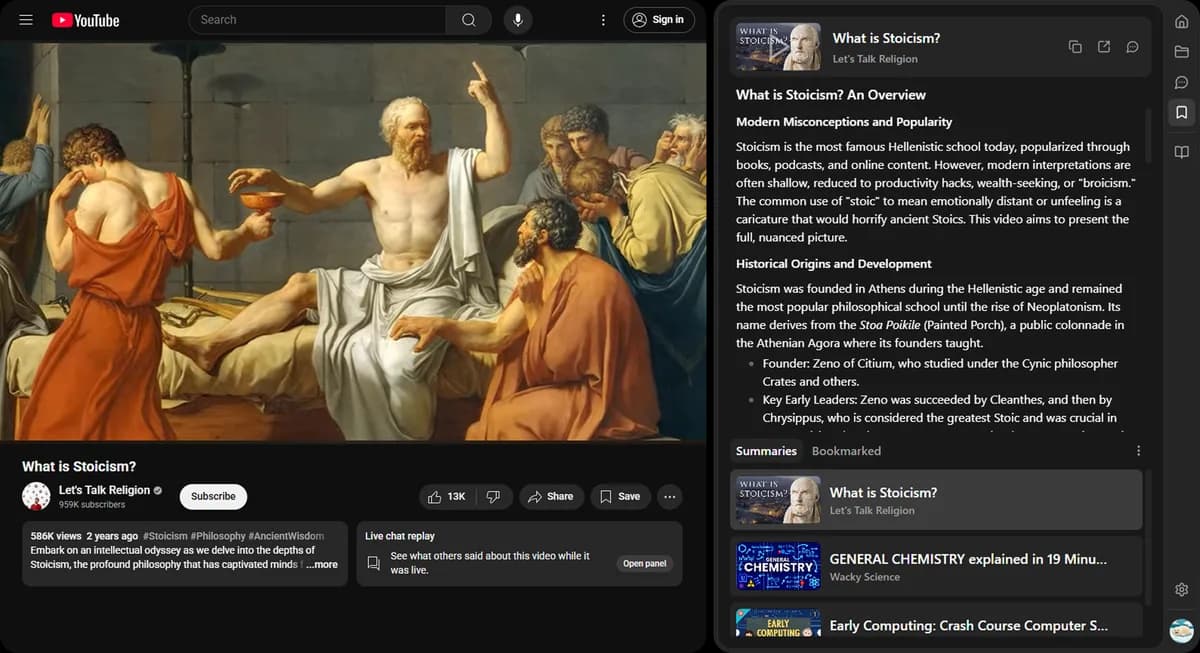
Watch as usual—or paste a link below. Dockbox lives in your Chrome sidebar, one click away.
The extension recognizes the page and starts summarizing. No copy-pasting transcripts.
Key points and takeaways appear ready to save—while you keep browsing.
Transcript sites compete on speed. Dockbox wins when you want notes where you already work: inside Chrome.
Notes, AI chat, and YouTube summaries — all in one Chrome sidebar.
Install Dockbox and turn the next video you watch into structured notes—without leaving the page.