Select text in your note
Highlight a paragraph, section, or entire note in Dockbox's sidebar editor—right where you're already working.
AI writing assistant · Chrome sidebar note editor
Dockbox's writing assistant lives inside your note editor. Select text, ask AI to refine it, and accept changes with a diff preview—so writing stays in your workflow, not another tab.
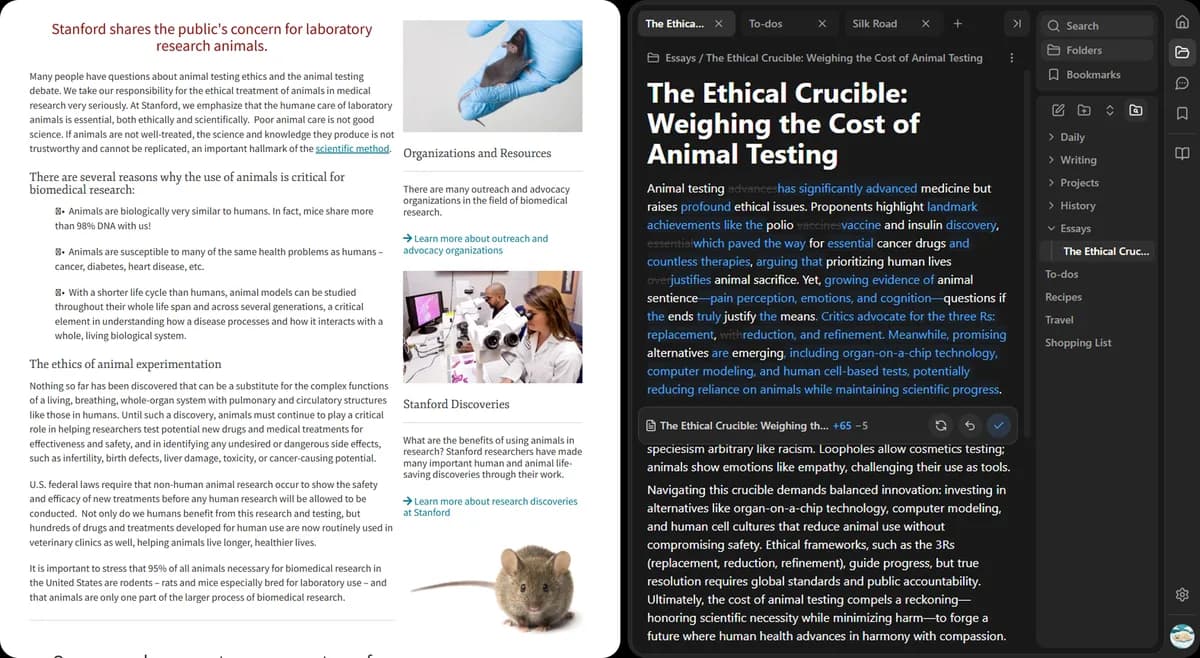
Highlight a paragraph, section, or entire note in Dockbox's sidebar editor—right where you're already working.
Pick a built-in action like improve, shorten, or translate—or type your own instruction or custom prompt.
See a diff of AI edits before they land in your note. Keep what works, discard what doesn't.
Generic chat tools make you shuttle text back and forth. Dockbox keeps AI inside your note editor, where structure and formatting matter.
Notes, AI chat, and YouTube summaries — all in one Chrome sidebar.
Install Dockbox and refine your next note with built-in AI actions—or save custom prompts for the edits you reach for most.